
Aviator Assistant - Pilot App
Aviator AssistantWeather
4.638.00 Reviews
- Version
- 4.1.0
- Installs
- 100.00K
- Age Rating
- Everyone
Screenshots
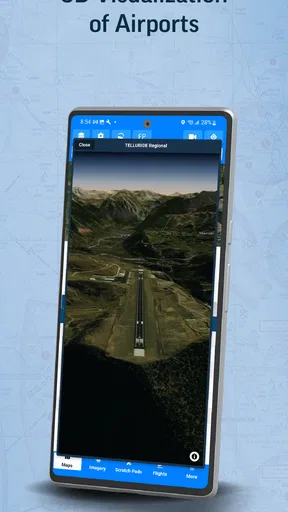
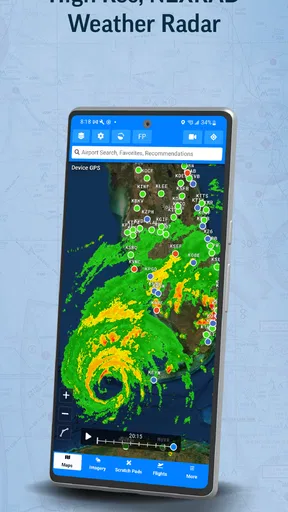
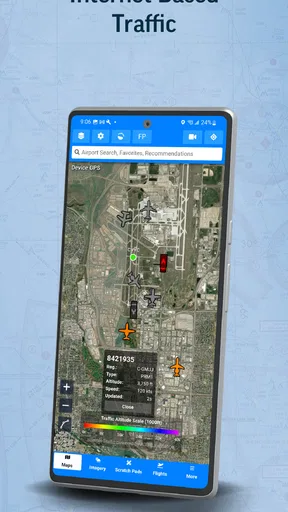
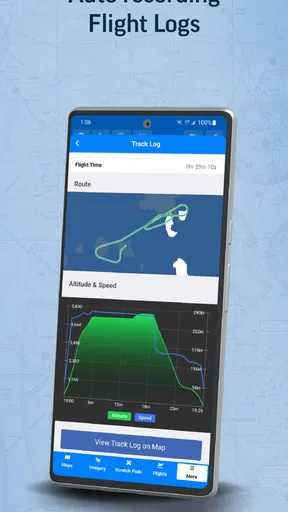
Our Review of Aviator Assistant - Pilot App
 Analysis by Appyee
I treat any phone app used around flying with a different standard from an ordinary weather widget: it should help me think clearly, not encourage me to trust a screen over proper planning or cockpit procedures. That is the lens I would use when considering Aviator Assistant - Pilot App. Its name and its flight-planning focus point toward pilots rather than people who simply want tomorrow’s umbrella forecast, so the useful question is whether it fits into a careful workflow and what I should keep separate from it.
Start with the decision you need to make
For a pilot, “What’s the weather?” is rarely a single question. I might be deciding whether to leave at all, whether a planned route still makes sense, or whether I need more time to check conditions before committing. A dedicated aviation-oriented app can be more relevant than a general forecast app because the decision is tied to a flight, not just a daily outfit. Still, I would begin with the same basics: identify the trip, check the conditions through the appropriate sources, and use an app as one part of that process rather than as permission to fly.
This is also where expectations matter. The app is made by Aviator Assistant, and its stated purpose is flight planning. That makes it a more natural candidate for pilots and student pilots than for someone who only needs a local rain alert. It is free to install, has an Everyone content rating, and supports Android starting with version 5.1. There are in-app purchases, with listed items ranging from $9.99 to $89.99, so I would check what an optional purchase covers before treating the free download as the complete experience.
Work through a plan instead of chasing a forecast
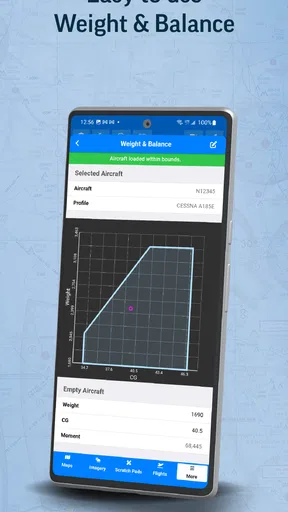
I find the most useful way to approach a flight-planning tool is to start with the route and the decision it supports. First, I would enter or review the intended trip, then look at weather in relation to that plan rather than scanning disconnected conditions. A forecast that looks fine near departure may not answer what matters later along the route. The practical benefit of a flight-focused workflow is the chance to bring the planning question and the weather check closer together.
A small but important habit is to keep a deliberate pause between checking information and acting on it. I would compare the app’s view with my established preflight sources, then ask what has changed since I last checked. That makes the phone useful as a prompt to reassess, rather than a substitute for judgment. If conditions are marginal or the plan has shifted, I would rather stop and verify than let a tidy interface make the choice feel simpler than it is.
On a realistic day, I might be preparing for a short trip and notice that the expected conditions along the route deserve another look. I would use the app to organize that check, confirm the details through the sources and procedures I normally rely on, and decide whether the original plan remains sensible. If it does, the app has helped keep the preparation focused. If it does not, the useful outcome is recognizing that early and revising the plan—not forcing a departure because I already opened a planning screen.
Using Aviator Assistant in a pilot’s routine
That workflow is a better measure of the app than a long list of supposed features. I want a planning companion to help me prepare, notice when I need to investigate further, and keep the decision in my hands. I would not assume that an app’s flight-related presentation makes its information complete, current enough for every decision, or suitable as the sole basis for a safety-critical choice.
Who is likely to get the most from it?
I would put the best fit at the intersection of active flight planning and comfort with checking information carefully. A student pilot may appreciate having a purpose-built place to focus on weather as part of preparation, while an experienced pilot may value a quick planning aid that sits alongside familiar tools. The key is not how many screens an app offers; it is whether it helps you ask better questions before a flight.
By contrast, I would not choose this as my main weather app if I only want broad local forecasts, simple alerts, or an easy view for a family outing. A general weather service is usually a more direct fit for those needs. I would also be cautious if I expected a phone app to replace formal flight-planning resources, cockpit equipment, or the pilot’s own checks. It should support a process that already has clear safety boundaries, not blur them.
There is a useful trade-off here: specialized tools can make a particular task feel more relevant, but specialization is only valuable when the information and workflow match the job. Before relying on any planning app, I would check whether the way it presents conditions suits my aircraft, route, and personal procedure. I would also decide in advance what I will do if the phone is unavailable or the app cannot provide what I need. That backup plan is more useful than assuming a single device will always be ready.
Where the handoffs need care
Flight preparation often moves between tools and people: a pilot checks conditions, discusses a plan, consults official sources, and then carries the decision into the cockpit. A phone can help keep that sequence organized, but every handoff is a chance for stale or misunderstood information to travel with the plan. I would make a point of checking the timing and context of anything I intend to use, especially after a delay or a change of route.
There is also a difference between having information on a screen and having a record that is suitable for later review. If you use any app to support planning, make sure you know which details you need to capture separately for your own records or training. I would not assume that a planning aid automatically provides a complete flight log, maintenance tracker, communication record, or post-flight analysis unless I had confirmed those functions in the app itself. Keeping those tasks distinct prevents an attractive all-in-one idea from turning into a gap in your routine.
On Android, the minimum operating-system requirement means an older compatible phone may be able to install it, but compatibility alone does not tell me whether that device is readable or dependable in the conditions where I would use it. I would test the screen and workflow on the ground, with the device positioned safely, and avoid learning the interface while attention belongs outside. If the display is difficult to read or the controls take too much concentration, a simpler tool or a paper backup may be the better choice.
What to expect before committing
The app’s public reception is encouraging but modest in scale: it holds a 4.6 average from around 380 ratings, with 100K+ installs. I see that as a reason to take a closer look, not proof that it will suit every pilot or every aircraft. The current release is version 4.1.0, and the app first appeared on May 22, 2021. Those details help set context, but they do not replace a hands-on check of the functions you personally need.
One practical question is whether the free version covers your routine or whether a paid item is required for a feature you care about. I would browse the available in-app purchases before building a workflow around the app, particularly because the listed purchase range runs from $9.99 to $89.99 per item. Another question is whether it fits your existing planning habits. If you already have a trusted setup, try the app as a secondary aid first; switching tools during a busy period creates friction that may outweigh any convenience.
For someone deciding between this and a conventional weather app, I would make the choice by task. If the goal is everyday local weather, the ordinary forecast app is likely faster and less specialized. If the goal is to think about weather in the context of flight planning, Aviator Assistant is the more relevant type of tool to investigate. Neither choice removes the need to verify information through suitable aviation sources or to follow established procedures.
Where the flow can break
The biggest risk in any phone-based planning workflow is treating convenience as certainty. A route can change, a check can become outdated, and a small screen can make it easy to overlook context. I would avoid making a go/no-go decision from a quick glance, and I would not let a well-organized app screen create confidence that the underlying situation does not justify. For a safety-critical task, the app belongs inside a broader process with clear cross-checks.
There is also a personal-fit question. If you dislike managing information across a phone and other planning sources, this may feel like another stop rather than a shortcut. If you want a simple forecast without aviation-specific planning, it may be more app than you need. And if your approach depends on features you have not tested, I would hold off on relying on it until you have confirmed that the workflow behaves as expected on your device.
My overall view is that Aviator Assistant makes the most sense as a flight-planning companion for pilots who are willing to verify what they see and keep their normal safety process intact. I would install it to explore whether its weather-planning approach fits my routine, then judge it on the ground before giving it a role in a real trip. Its 4.6 average suggests many users have found value, while the in-app purchase range is a reminder to check the boundaries of the free experience. For everyday forecasts, I would use a general weather app; for flight preparation, this is the more relevant option to evaluate—but never the only check I would make.
Getting Started with Aviator Assistant
First off, the installation process is a breeze. I downloaded it from the App Store, and in no time, I was setting up my profile. The interface is clean, intuitive, and designed with pilots in mind. No cluttered screens or unnecessary features—just the essentials you need at your fingertips.
Features that Fly High
Okay, buckle up, because the feature list is impressive. One of the highlights for me was the flight planning tool. It offers real-time weather updates, which, as any pilot knows, is crucial for smooth operations. I particularly loved the way it integrates with navigation systems to provide route optimization. It’s like having a mini flight operations center in your pocket.
Another cool feature is the logbook. Aviator Assistant - Pilot App automatically records your flights and syncs them across your devices. Say goodbye to manual entries and hello to more flying time. It even sends reminders for upcoming maintenance checks and license renewals, which is a lifesaver for the forgetful among us.
In-Flight Experience
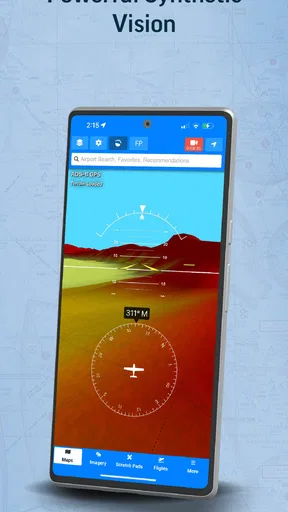
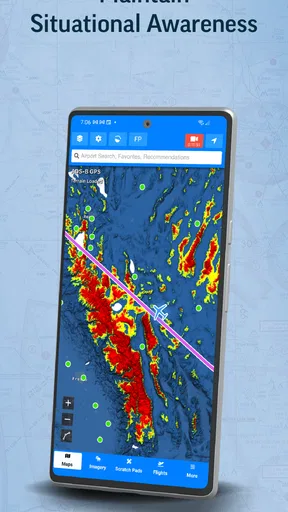
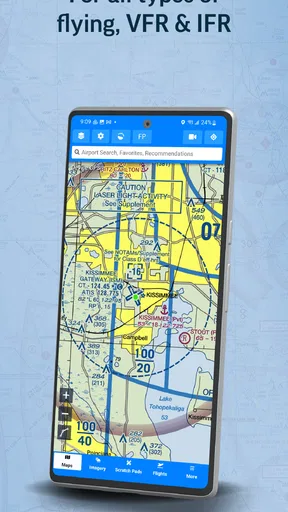
Once airborne, the app continues to shine. The moving map display is crisp and clear, providing real-time tracking that’s as reliable as your trusty altimeter. I found the ability to overlay weather data particularly useful for navigating tricky conditions. Plus, the app’s ease of use ensures you can access what you need without taking your eyes off the sky for too long.
Communicating with air traffic control is simplified with the app’s built-in communication logs. You can easily keep track of ATC instructions and other important communications, making sure no detail slips through the cracks.
Landing and Beyond
After landing, Aviator Assistant doesn’t just say goodbye and leave you hanging. It offers comprehensive post-flight analytics that help you review your performance and flight data. Whether you’re a student pilot or a seasoned veteran, these insights can be incredibly valuable for honing your skills.
And if you’re into sharing your adventures, the app lets you easily export flight data to social media or your pilot community forums. Who doesn’t love a good in-flight selfie with all the juicy flight stats?
Final Thoughts
All in all, Aviator Assistant - Pilot App is a must-have for any pilot looking to enhance their flight experience. It’s packed with features that are not only practical but also genuinely helpful for improving flight operations. The seamless integration of tools and the attention to detail show the developers really know what pilots need. Whether you’re flying for the first time or have thousands of hours under your belt, this app is worth a download.
If you’re ready to take your piloting to the next level, check out the download link on our site and give Aviator Assistant a try—your co-pilot will thank you!
Verdict
Strengths of Aviator Assistant - Pilot App
- Comprehensive flight planning features.
- Real-time weather updates available.
- Intuitive user interface design.
- Offline access to essential data.
- Customizable checklists for pilots.
Limitations of Aviator Assistant - Pilot App
- Limited support for older devices.
- Requires subscription for premium features.
- Occasional syncing issues reported.
- Some features need internet access.
- Battery usage can be significant.
Other Releases by Aviator Assistant
View All
Weather Scope NOAA Live Radar
Weather4.5
Similar Picks in This Category
View All
Weather - By Xiaomi
Xiaomi Inc.4.1

Weather & Radar Forecast
WetterOnline4.8

Weather
OneLouder Apps4.6

AccuWeather: Weather Radar
AccuWeather3.6

The Weather Channel - Radar
The Weather Channel4.6

1Weather Forecasts & Radar
OneLouder Apps4.3
Frequently Asked Questions
What features does Aviator Assistant offer to pilots?
Aviator Assistant provides a comprehensive suite of tools designed to aid pilots, including flight planning, real-time weather updates, navigation aids, and in-flight checklists. The app also integrates with various aviation databases to ensure accurate and up-to-date information. Its user-friendly interface makes it accessible for both novice and experienced pilots.
Is Aviator Assistant available for both Android and iOS devices?
Yes, Aviator Assistant is available on both Android and iOS platforms. Users can download it from the Google Play Store or the Apple App Store. The app is optimized for smooth performance across different devices, ensuring pilots can access its features regardless of their preferred operating system.
Does Aviator Assistant require an internet connection to function?
While some features of Aviator Assistant, like real-time weather updates and database synchronization, require an internet connection, many functionalities are accessible offline. Pilots can plan flights and access navigation tools without connectivity, making it useful even in areas with limited internet access.
Is there a subscription fee for using Aviator Assistant?
Aviator Assistant offers a free version with basic features, but a premium subscription is available for those who require advanced functionalities. The subscription provides access to enhanced tools and real-time data, ensuring pilots have everything they need for efficient flight management. Pricing details are available on the app’s download page.
How user-friendly is Aviator Assistant for new pilots?
Aviator Assistant is designed with a user-friendly interface that caters to pilots of all experience levels. New pilots will appreciate the intuitive design and comprehensive tutorials that guide them through each feature. The app’s ease of use helps reduce the learning curve, making it an excellent tool for pilots just starting out.
